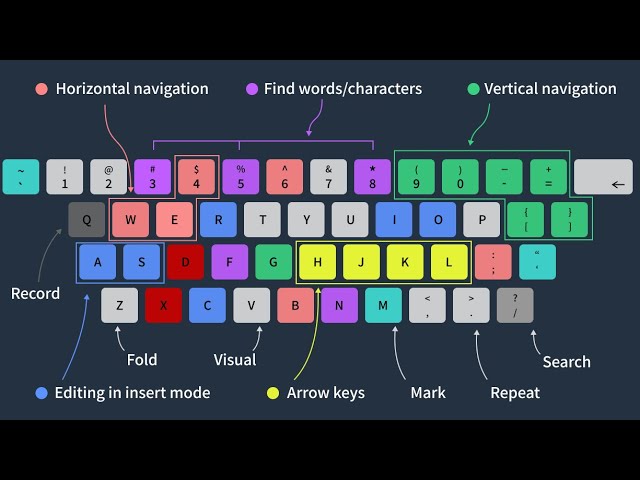
Basic#
Nouns in Vim -- Text Objects#
指代光标所在的文本对象,Prefer text objects to motions when possible
<span style="font-family: ''; font-size: 13.028571128845215px">iw  "inner word</span>
<span style="font-family: ''; font-size: 13.028571128845215px">it  "inner tag, such as html tag</span>
<span style="font-family: ''; font-size: 13.028571128845215px">i"  "inner quotes,即""包围的文本</span>
<span style="font-family: ''; font-size: 13.028571128845215px">ip  "inner paragraph</span>
<span style="font-family: ''; font-size: 13.028571128845215px">as  "a sentence</span>

<span style="font-family: ''; font-size: 13.028571128845215px">"examples</span>
<span style="font-family: ''; font-size: 13.028571128845215px">diw "删除光标所在word</span>
<span style="font-family: ''; font-size: 13.028571128845215px">ci" "替换光标所在quotes</span>
Nouns in Vim -- Parameterized Text Objects#
f, F       "find
t, T       "find, 光标在匹配字符前
/          "search
v motion#
:w FILENAME "将当前编辑文件中可视模式下选中的内容保存到文件FILENAME 中。
:w !pbcopy "复制到osx 剪切板
:r FILENAME "提取磁盘文件 FILENAME 并将其插入到当前文件的光标位置后面。
:r !dir     "读取 dir 命令的输出并将其放置到当前文件的光标位置后面。
按【Star】键选中、高亮所有:%s///gc#
c 指代每次执行替换的时候添加确认!:g//d#
全局匹配 & 删除:reg#
vim寄存器,以下优先理解
| "" |
unnamed register,default to `p`/`P` |
| "a-z |
具名寄存器 |
| "0 |
通常情况下与""等效
|
| "1-9 |
寄存删除文本历史 |
以下只需了解
| ". |
寄存最近插入文本 |
| ": |
寄存最近执行命令 |
| "% |
寄存当前文件Path |
| "- |
delete register |
| "* and "+ |
selection register ,即系统剪切板
|
| "/ |
last search register |
| "_ |
black hole register |
"= expression register
insert mode 下:
Ctrl-r =<expr> // 其中 expr 可以是类似 1+1 或者从寄存器取值@<寄存器名>
<enter>
normal 模式下:
"=<expr>

<enter>
p // 这一步将"=中的值 paste 出来,不如insert mode简洁
复制到系统剪切板:
<selection> "* y // v-mode 下选中复制到剪切板
"*y <selection> // n-mode 下复制到剪切板
Wrapper#
n-mode下,"<reg> <action> <selection>
v-mode下,<selection> "<reg> <action>Macros#
q + a "开始录制宏a,这里a可以替换成其他char
...   "vim 指令
q     "完成宏录制

@a    "调用宏一次
10@a  "调用宏10次k
VimScript#
let @*=@"
Tricks#
Multi-File Edit#
vim -p file file2 "-p 打开多个标签

:tabedit file2    "tabedit
gt / gT           "tab 向前/向后切换

2gt               "切换到第2个tab
2gT               "往回切换2个tab,注意与 gt 的逻辑不一样
切分窗口#
为什么不在 terminal 中多开几个窗口,每个窗口下使用 vim?
因为在vim split-window 下,可以跨文件yank + paste
Ctrl + w                       "前置指令
+ s / v                 "水平 / 垂直切分窗口
+ h / j / k / l / w     "光标在窗口间移动,w 为循环移动
+ + / -                 "窗口高度调节
+ < / >                 "窗口宽度调节

20-Ctrl-w-<                    "另外可以直接按指令,如左表示窗口向左调宽20
20-Ctrl-w-|                    "设置宽度为20,如需设置高度,则将`|`替换成`_`
保存/重载Session#
:mksession filename.vim
vim -S filename.vim
Ctrl + X + tab  "显示候选
Ctrl + N        "选中第一个,连续按选中下一个
Ctrl + P        "选中最后一个,连续按选中前一个
简易File Explore#
:Lex  "左侧打开 File Explore,且不会关闭
:Lex! "右侧打开
:Ex   "基础的 Explore,当前窗口打开
"其他指令
:Hex
:Sex
:Vex
Multi-Editor#
`Ctrl + V`,之后选中,再按Shift + 编辑模式指令,进入编辑模式,编辑完成之后,按Esc完成批量编辑.
以上功能,将字符设定为 `#` 或者 `//` 等,就可以在不同语言中实现注释的功能。
同理,垂直选中注释符,再按`x`,则可以实现取消注释的功能。